How to open your Character.AI export
Last checked: against Character.AI’s help article on data export
Unzip the file Character.AI emails you, then drop the JSON file into the viewer below. It runs entirely in your browser: nothing is uploaded. You can read chats as conversations and save them as TXT or PDF.
Export viewer
Your file never leaves your device. The viewer reads it with your browser’s file tools and processes it on this page. This page’s security policy blocks connections to any other site, and it has no analytics.
Tested with our sample file only. If your export does not display correctly, the viewer will show the raw data instead.
Character.AI’s help center does not describe the format of the export file, so the viewer does not assume one: it looks for lists of messages in any JSON or JSON Lines file. If it finds none, it shows the file as a collapsible tree.
Is the Character.AI export ZIP password protected?
Character.AI’s help center does not say whether the export is password protected or what the password would be. Its article How do I download my data? (updated 8 October 2026) only says the download link is emailed to the address on your account and is valid for 7 days. If you cannot open the file, ask Character.AI through its support request form.
How can I tell who said each message in my Character.AI export?
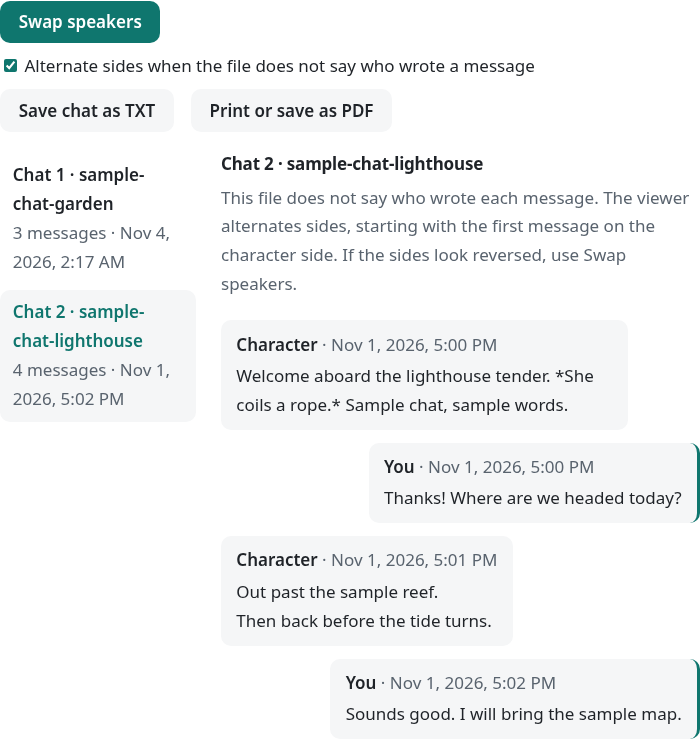
Character.AI has not published the export format, so the viewer labels each message with the speaker field it finds in your file; if the labels look reversed, press Swap speakers. If your file has no speaker field at all, the viewer says so above the chat and alternates sides, starting with the first message on the character side; you can switch alternating off.
Does my file leave my device?
No. The viewer reads your file inside your browser and sends nothing to any server, so you can check it with your network turned off. The page loads its own scripts when it opens; after that, choosing a file causes no network requests, and the page’s security policy blocks connections to any other site.
Open this page, then turn off your network
Wait until the page has finished loading, then switch off Wi-Fi or turn on airplane mode.
Load your file
Choose or drop your JSON file. It still opens, because nothing needs the network.
Check the Network panel
On a computer, open your browser’s developer tools (F12, or Cmd+Option+I on a Mac) before loading the file and select Network: it stays empty while the file is read.
Uploading the same file to ChatGPT or another AI service is different: the file then goes to that company. Your export may contain private conversations. OpenAI’s help article Data controls in ChatGPT says that “On personal workspaces with ChatGPT Free, Plus, or Pro, data sharing is enabled by default”, and that you can turn off the setting “Improve the model for everyone” (Settings, then Data controls). That statement applies only to personal workspaces on ChatGPT Free, Plus, or Pro. Read the service’s own data controls before you upload anything, or use a local viewer first.
What if my message.json is too big to open?
Text editors and phone apps often freeze on very large JSON files; drop the file into the viewer instead. The viewer reads the file in 4 MB chunks in a background worker and parses each message as it arrives, so the whole file is never loaded as one block of text. Long chats are shown 200 messages at a time with a “Show more messages” button.
In our own test in Chromium on a desktop computer, a 426 MB sample file we generated (800,000 messages) opened in about 10 seconds, and the browser used about 2.3 GB more memory while it was open. We do not state a size limit; it depends on your device’s memory, so a computer may manage files that a phone cannot.
How do I open message.json?
Unzip the download, then choose the JSON file with your messages in the viewer above. Some guides call that file message.json; Character.AI’s help center does not name the files in the export.
Unzip the download
Save the file from Character.AI’s email before the link expires, then extract it with your computer’s or phone’s unzip tool.
Drag the JSON file into the viewer
Or click the box and choose the file. Large files are read in the background, and long chats are shown 200 messages at a time.
Read or export
Pick a chat from the list. Use Swap speakers if the sides look reversed, then save the chat as TXT or PDF.
How do I convert my Character.AI chats to text or PDF?
Open the chat in the viewer, then click Save chat as TXT for a plain-text file, or Print or save as PDF for a PDF. For the PDF, choose “Save as PDF” (or “Microsoft Print to PDF” on Windows) as the printer in your browser’s print window. The viewer loads the whole chat before printing, so very long chats can take a moment.
Can I import my export into SillyTavern?
Not directly from this viewer yet. SillyTavern’s chat file documentation says to use the third-party CAI Tools browser extension to import Character.AI chats and bots; see the SillyTavern docs. We will update this section if we add a format converter.
FAQ
Is my data uploaded?
No. The viewer reads your file in your browser and processes it on this page. Choosing a file causes no network requests, and the page’s security policy blocks connections to other sites.
What if the viewer shows raw JSON?
It means the viewer did not recognise chats in your file. You can still open each section of the raw data to read it. The viewer has been tested with our sample files only.
How do I open a password-protected ZIP on my phone?
Character.AI’s help center does not say whether the export is password protected. This viewer does not open ZIP files: extract the file first with an app that can open ZIP files, then choose the JSON file. If you cannot open the file, contact Character.AI support.
What if the password doesn't work?
Contact Character.AI support.
My message.json is over 200MB and won't open
Drop it into the viewer instead of a text editor. The viewer reads the file in 4 MB chunks in a background worker, never as one block of text, and shows long chats 200 messages at a time. In our test, a 426 MB sample file opened in about 10 seconds in desktop Chromium. We do not state a size limit; it depends on your device’s memory, so a computer may manage files that a phone cannot.
How can I tell who said each message?
The viewer uses the speaker field it finds in your file. If the file has none, the viewer says so and alternates sides; press Swap speakers if the labels look reversed, or switch alternating off.
What is inside the export?
Not stated. Character.AI’s help center says only that you can request “a copy of your account data”; it does not list the files.
Why are some chats missing from my export?
Not stated. Character.AI’s help center does not explain what the export leaves out. Ask Character.AI support, and keep your account until you have checked the file.
Is it safe to upload my export to ChatGPT or another AI?
Your export may contain private conversations, and uploading it sends them to that company. Read its data controls first; for ChatGPT, see OpenAI’s Data controls in ChatGPT. To read the file without sending it anywhere, use a local viewer like this one.